
Instagram Followers Decreasing Automatically? 8 Reasons and Fixes
If your Instagram followers are decreasing automatically, it is almost always because Instagram is removing fake, inactive or deleted accounts, or because real people are slowly unfollowing. A loss of a few followers a day, or 1 to 3% in a month, is normal for almost every account. A sudden drop of 10% or more usually means a platform cleanup or low-quality followers. This guide explains every common reason, how to tell which one is affecting you, and what you can actually do about it.
Why Are My Instagram Followers Decreasing Automatically?
When people say their Instagram followers are decreasing "automatically", they usually mean the number goes down even though they did nothing different. You open the app in the morning and you have 20 fewer followers than last night. Or you notice that you have been stuck at the same number for weeks, even though you can see new people following you.
The reason is simple: your follower count is not a fixed number. It is a live total of all the accounts that follow you right now. Every day, some of those accounts are deleted, some are deactivated, some are removed by Instagram, and some real people decide to unfollow. At the same time, new people find you and follow. The number you see is the result of both sides. When new followers slow down, the losses that were always there become visible.
So the first thing to understand is that a falling count is not always a problem with your account. Often it is a sign that Instagram is cleaning up its network, which in the long run makes your audience more real. But sometimes it is a sign that your content, your growth method or the followers you got are the problem. The sections below go through each reason one by one, from the most common to the least.
Instagram Removes Fake and Inactive Accounts
This is the number one reason for Instagram followers decreasing, and it affects everyone, including big celebrities. Instagram and Meta constantly look for fake accounts, spam bots and accounts that break the rules. When those accounts are removed or disabled, every follow they made disappears at the same moment. If 30 of your followers were bots and Instagram removes them today, you lose 30 followers today, even though no real person unfollowed you.
These cleanups do not happen at a fixed time. Sometimes they are small and spread over weeks, so you lose a few followers a day. Sometimes Instagram runs a bigger sweep and many accounts lose hundreds or thousands of followers in a day or two. When that happens, you will often see other creators talking about it at the same time, which is a good clue that the drop is not about you.
You cannot stop this, and you should not want to. Bot followers never see your posts, never like or buy anything, and they make your engagement rate look worse. Losing them is not a real loss. It just makes your number more honest.
People Deactivate or Delete Their Accounts
Not every lost follower was fake. Real people also leave Instagram, take a break or close an old account. When someone temporarily deactivates their account, they disappear from your follower list until they log back in. When they delete it, they are gone for good.
This is especially common around exam periods, holidays and the new year, when many people take a social media break. It also happens when people move to a new account and stop using the old one. In those cases, some of your "lost" followers may come back on their own after a few weeks, which explains why some accounts see their number go down and up again without any clear reason.
There is nothing to fix here. It is normal life on any social network. Just know that a small, steady loss is part of the background, and your goal is to gain faster than that background loss.
Follow-for-Follow and Follow-Unfollow Accounts
If you ever grew by following lots of people and hoping they follow back, or by joining "follow for follow" groups, a part of your audience is not really interested in your content. Many of these accounts follow you only to get a follow back, and then unfollow after a few days or weeks. Some use apps to follow and unfollow thousands of accounts automatically.
The result is a slow, steady leak. You gain followers quickly while you are active in these groups, then the number slides down when you stop. It feels like your Instagram followers are decreasing for no reason, but in fact the "growth" was never stable in the first place.
The fix is to stop relying on follow-back growth. It also helps to avoid following and unfollowing large numbers of accounts yourself, because Instagram can limit accounts that do this too often. Real followers who chose you because of your content are much less likely to leave.
Low-Quality Bought Followers Are Dropping
If you have bought followers from any service, a part of them may now be dropping. Cheap followers usually come from newer or empty accounts, and those are exactly the accounts Instagram removes first. This is why a cheap order can look great on day one and lose a large part of its followers in the next weeks.
We run an SMM panel, so we see this side of the story every day. Since 2020, JTSMMPANEL has processed more than 1.9M orders, and the pattern is always the same: the cheaper and faster the service, the higher the drop. That is why we always tell buyers to look for services with refill, which means the missing amount is sent again for free within a set period. Our guide SMM Panel Refill and Drop Explained covers labels like R30 and "non-drop" in detail, and why no honest panel can promise zero drop.
If you used a panel and your followers dropped inside the refill period, open your Orders page and press the refill button on that order. If there is no button or something looks wrong, open a support ticket with the order ID. If the service had no refill, the drop will not be replaced, so choose a refill service next time and start with a small test.
Your Content Changed or Slowed Down
Real people unfollow when an account stops giving them what they followed it for. This is the reason most creators do not want to hear, but it is very common. If you started as a food page and now post mostly memes, many of your early followers will leave. If you used to post every day and now post once a month, people forget who you are, and when your post finally shows up, they unfollow because they do not recognize you.
The opposite can also happen. Posting too much in a short time, such as ten stories in a row every hour or many similar posts in one day, can annoy people and push them to unfollow or mute you. Heavy promotion has the same effect. If every post is a sales message, followers who came for value will slowly leave.
Look at your last month honestly. Did you change your topic, your posting schedule or your style? Did the drop start around the same time? If yes, the fix is not technical. It is about going back to a clear topic and a steady, realistic schedule that you can keep.
A Glitch or Delayed Count
Sometimes the number itself is wrong for a short time. Many people search for "Instagram followers decreasing glitch" because they see the count jump down and then back up, or see different numbers on the app and on the website. Instagram's systems update counts in the background, and during big updates or server problems the number shown can lag behind the real total.
A good way to check is to look at your account from two places: the app on your phone and instagram.com in a browser, or ask a friend to open your profile. If the numbers are different, or if the count goes back to normal within a day or two, it was a display issue, not a real loss. Updating the app and clearing its cache (on Android) can also fix a count that seems stuck.
If the lower number stays the same everywhere for several days, then it is a real change, and one of the other reasons in this guide is the likely cause.
Third-Party Apps and Old Connections Were Removed
Some accounts once used apps that promised free followers, likes or "who unfollowed me" reports. Many of these apps ask you to log in with Instagram. When Instagram blocks these apps, or when the app's network of accounts is removed, the followers you got through them can disappear together. At the same time, any account that the app controlled can be removed, which reduces your count again.
Check your connected apps in Instagram under Settings, then Apps and websites (the exact name can change between app versions). Remove anything you do not use or do not trust. Never give your Instagram password to a growth app. A real growth service, such as an SMM panel, only needs your public profile or post link. If something asks for your login, it is a risk to your account, not a growth tool.
After removing these apps, you may lose a few more followers at first. That is fine. It is better to have a smaller, real audience than a big one that can vanish any time.
Your Reach Dropped, So Losses Show More
Sometimes the problem is not that you lose more followers than before. It is that you gain fewer. Every account always has some unfollows in the background. When your posts reach many new people, new follows hide those losses. When your reach drops, the background losses become bigger than your gains, and the total goes down.
Reach can drop for many reasons: a change in the algorithm, fewer Reels, older content formats, or a warning on your account. Instagram has an Account Status page in Settings where you can see if any of your content was removed or is not recommended to new people. If you see a warning there, fix or remove the post, read the reason, and avoid repeating it.
In most cases, reach comes back when you post fresh content that people actually watch to the end. Short Reels with a strong first second, clear captions and a reason to share are still one of the best ways to reach people who do not follow you yet.
Normal Loss or a Real Problem?
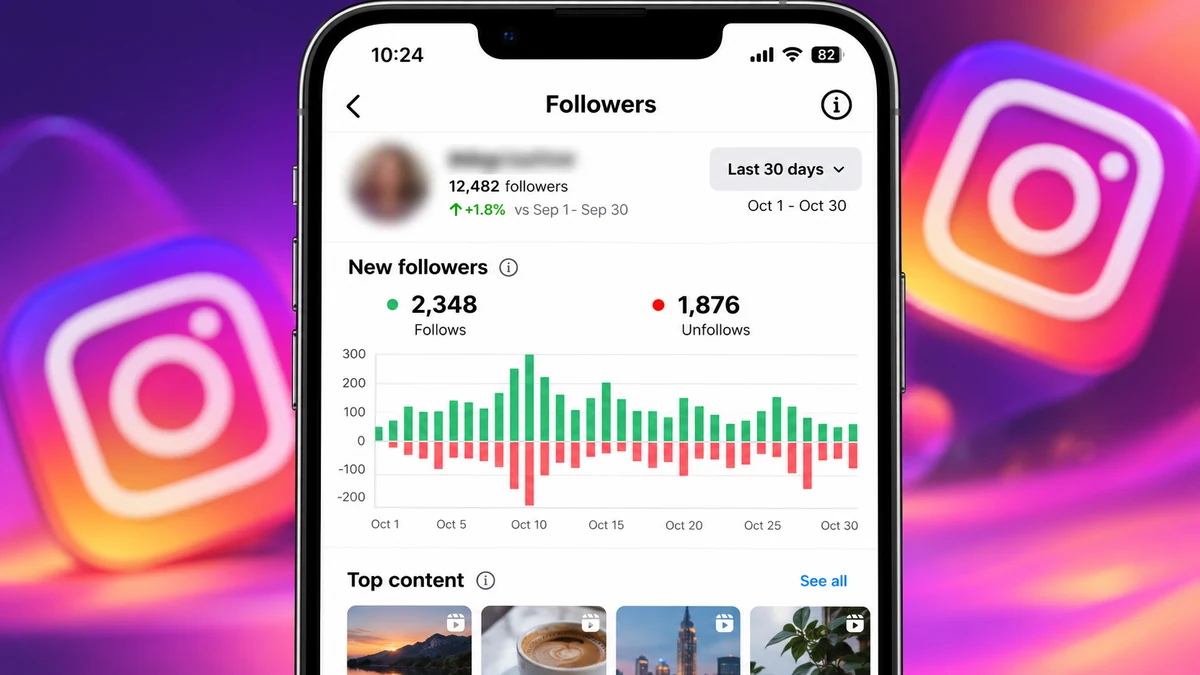
It helps to put a number on the drop before you worry. Compare your follower count today with the count 7 and 30 days ago. Instagram Insights (on a professional account) shows follows and unfollows over time, which makes this easy.
| What you see | What it usually means |
|---|---|
| A few followers lost a day, but you still grow overall | Completely normal background loss |
| 1 to 3% lost over a month, little new growth | Normal loss, but your reach needs work |
| 5 to 10% lost in a few days | Likely a cleanup, or bought or follow-back followers leaving |
| 10% or more in a day or two | Big platform cleanup or a large group of low-quality followers removed |
| The number goes down, then back up | Display glitch or people returning from a break |
These are general patterns from what we see across many accounts, not exact rules. Very small accounts can see bigger percentage changes from just a few unfollows.
Step-by-Step: Find Out Why Your Followers Are Decreasing
- Write down the numbers. Note your count today and check Insights for the last 7 and 30 days, so you know the real size of the drop.
- Check from another device. Open your profile on instagram.com or from a friend's phone to rule out a display glitch.
- Look for a wider cleanup. Search for other people reporting drops on the same days. If many do, it is not about you.
- Open Account Status. In Settings, check if any post was removed or is not being recommended.
- Review connected apps. Remove any growth or tracking app you do not trust.
- Think about past growth. Did you use follow-for-follow, giveaways or cheap bought followers? Those groups leave first.
- Compare with your content. Did your topic, schedule or style change around the time the drop began?
Tips to Stop Losing Followers and Grow Again
- Keep one clear topic. People follow for a reason. Make it easy to understand what your account is about from your bio and your last nine posts.
- Post on a schedule you can keep. Three good posts a week every week is better than ten in one week and none in the next.
- Use Reels to reach new people. Most new followers find you through Reels and Explore, not through your profile.
- Reply to comments and messages. Active conversations show Instagram and your audience that the account is alive.
- Stop follow-unfollow tricks. They bring followers who leave and can get your account limited.
- Protect your account. Turn on two-factor authentication and never share your password or login codes.
- If you use a growth service, be careful. Choose refill services, order small and slowly, and treat it as a push, not a strategy. Our guide to choosing an SMM panel explains what to check.
Red Flags That Make Drops Worse
- "Free followers" apps that ask for your login. They can steal your account and their followers disappear fast.
- Very cheap followers with no refill. These come from accounts that Instagram removes first.
- Promises of "100% real, never drop" followers. No one can promise that, because only Instagram decides which accounts stay.
- Huge jumps in a few minutes. Thousands of new followers overnight look unnatural and tend to drop later.
- Buying followers instead of posting. An account with a big number and no activity loses real followers too.
Final Thoughts: Instagram Followers Decreasing Is Usually Normal
In most cases, Instagram followers decreasing is a normal part of having an account. Instagram removes fake and inactive accounts, real people take breaks or lose interest, and follow-back or low-quality followers leave over time. A small, steady loss is not a reason to panic. A sudden big drop is usually a platform cleanup or a sign that a part of your audience was never real in the first place.
Focus on what you control: a clear topic, a steady posting schedule, Reels that reach new people and real conversations with the people who follow you. If you decide to use an SMM panel for a little extra social proof, do it the careful way, with small refill services, a slow pace and real content alongside it. You can see how our Instagram services work and compare refill periods on the full service list before you decide.
Frequently Asked Questions
Why are my Instagram followers decreasing automatically?
Most often Instagram is removing fake, spam or inactive accounts, and their follows disappear with them. Real people deactivating accounts or unfollowing also lowers the count. A small daily loss is normal for every account.
Is it normal to lose Instagram followers every day?
Yes. Almost every account loses a few followers a day. It only becomes a problem when you lose more than you gain for several weeks, or when you suddenly lose 10% or more.
Is there an Instagram followers decreasing glitch?
Sometimes the count shows a lower number for a short time during updates. Check your profile on instagram.com or another phone. If the number goes back to normal in a day or two, it was a display issue.
Do Instagram followers come back after a drop?
Followers who deactivated their account can come back when they log in again. Accounts that Instagram deleted will not come back. If the drop came from a refill service, request a refill inside the refill period.
Why do bought Instagram followers decrease?
Cheap followers often come from newer or empty accounts, and Instagram removes those first. Services with refill send the missing amount again for free within the refill period, but no service can promise zero drop.
How can I stop losing followers on Instagram?
Keep a clear topic, post on a steady schedule, use Reels to reach new people, reply to comments and avoid follow-unfollow tricks. You cannot stop every unfollow, but you can gain faster than you lose.