Discover practical social media marketing tips, SMM guides,
platform strategies and insights to help you grow your
online presence and make the most of social media.
To pay on an SMM panel with bKash, Nagad or Rocket, log in, open Add Funds, choose the Bangladesh payment option, enter your amount in taka and complete the payment from your wallet. Your payment becomes panel balance, usually within a few minutes, and you use that balance to place orders.
বাংলায় সংক্ষেপে
লগইন করে Add Funds পেজে যান, বাংলাদেশের পেমেন্ট অপশনটি বেছে নিন, টাকার পরিমাণ লিখুন এবং স্ক্রিনের নির্দেশনা অনুযায়ী বিকাশ, নগদ বা রকেট থেকে পেমেন্ট করুন। ব্যালেন্স না এলে আবার টাকা পাঠাবেন না, Transaction ID সহ একটি টিকিট খুলুন। আপনার PIN বা OTP কাউকে দেবেন না।
You needA panel account and an active wallet
MinimumFrom $0.20 on the bonus option (about ৳26)
Arrives inInstantly to a few minutes in most cases
PricesIn USD, converted at the page rate
bKash, Nagad and Rocket Payment Options on an SMM Panel
An SMM panel works like a prepaid wallet. You add money first, and each order is deducted from that balance. You do not pay separately for every order, and you never type your wallet PIN into an order form.
On JTSMMPANEL, Bangladeshi users have two options on the Add Funds page, and both include all three wallets. Check both before you open your wallet app.
Min $0.20 + 7% bonus
Bkash / Nagad / Rocket + More Bangladeshi
Shown on a card labelled "Bkash/Nagad". This is the one to try first if you want the low minimum and the bonus.
bKash, Nagad, Rocket and more
Minimum and bonus shown in the option name
Offers can change, so read the name before you pay
More Bangladeshi methods
বিকাশ/নগদ/রকেট/উপায় + All Bangladeshi
Shown on a card labelled "Bangladeshi". Use it if you pay with Upay or another local method, or if the first option is unavailable.
bKash, Nagad, Rocket and Upay
Other Bangladeshi methods in one place
Same taka converter on the page
How to Add Funds with bKash, Nagad or Rocket
Have your wallet ready with enough balance. These five steps usually take about two minutes.
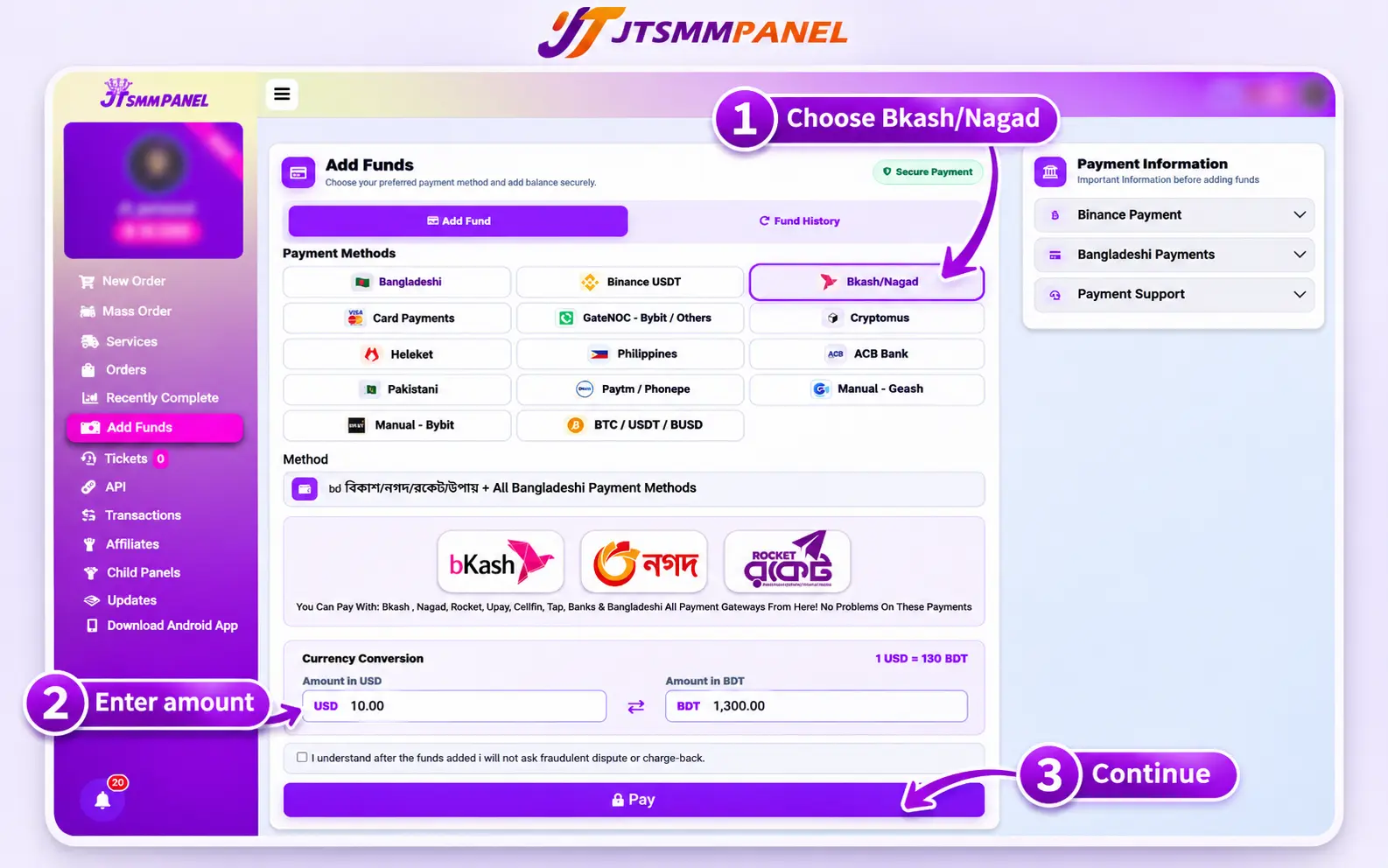
Choose the Bangladesh option on the Add Funds page, then enter your amount in USD or BDT.
Log in and open Add Funds
Sign in to your account and open Add Funds from the menu. New here? Create a free account first.
Select the Bangladesh payment option
Choose "Bkash / Nagad / Rocket + More Bangladeshi", or the option that lists all Bangladeshi methods. Read the instructions that appear, because the details can change.
Enter your amount
Type your amount in the USD or BDT box. The converter fills in the other box using the rate on the page. New users should start small and test one service first.
Complete the payment in your wallet
Follow the payment screen and choose bKash, Nagad or Rocket if it asks. Use the same amount and the same transaction type it shows, such as Send Money or Payment. Check the details, then confirm with your PIN only inside your wallet app or on its official dial menu.
Check your balance
Go back to the panel and refresh. If the screen asks for a Transaction ID, enter it once. Your balance should update within a few minutes. Keep your wallet receipt until you see the funds.
bKash vs Nagad vs Rocket: Which Should You Use?
All three are listed under the same Bangladesh options on JTSMMPANEL, so use the wallet that already has enough balance. Failed payments are often caused by low balance or wallet limits, not by the panel.
Check this
bKash
Nagad
Rocket
On JTSMMPANEL
Yes, both Bangladesh options
Yes, both Bangladesh options
Yes, both Bangladesh options
Reported personal transfer limit
৳50,000 per day and ৳3 lakh per month, and providers can set their own limits
Where to check your limit
Inside your bKash app
Inside your Nagad app
Inside your Rocket app
If your wallet has a problem
bKash helpline 16247
Help section in the Nagad app
Help section in the Rocket app
The limit is from news reports of Bangladesh Bank's March 2025 revision, checked in November 2026. It can change, and your app shows what applies to you.
How Taka Becomes Panel Balance
Service prices are listed in US dollars per 1,000 units, but you pay in taka. The Add Funds page converts your amount at the rate it shows at that time.
Example at ৳130 per $1, with the 7% bonus৳1,000 ÷ ৳130 per $1 = about $7.69 balance$7.69 + 7% bonus = about $8.23 balance$0.50 per 1,000 × 2,000 units = $1.00 order
The $0.50 price is only an example. Use the live rate on your Add Funds page and the live price on the services page.
Save These Details After Every Payment
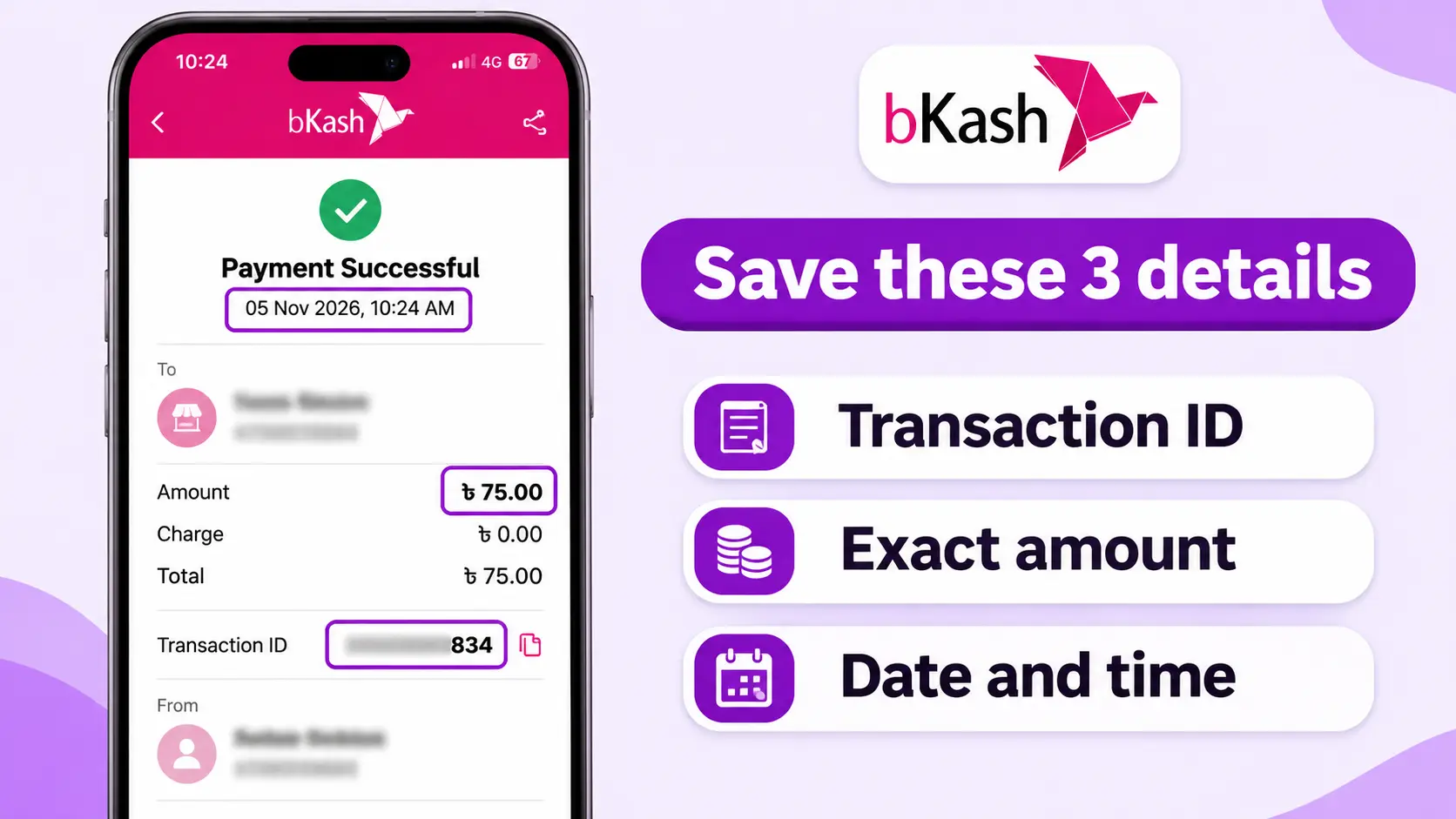
This small habit fixes most payment problems quickly. If something goes wrong, support needs these details to find your payment.
Your payment record
WalletbKash, Nagad or Rocket
Transaction IDFrom your wallet receipt or SMS
AmountExact taka amount
Date and timeFrom your wallet receipt
Panel usernameThe account you topped up
ProofFull receipt screenshot
The Transaction ID, amount and time are the details support needs. Keep your personal details private.
bKash, Nagad or Rocket Payment Not Showing? Fixes
Paid, but no balance after a few minutes
Check your wallet history first. If the money left your wallet, refresh the panel, then open a support ticket with your receipt. Do not pay again.
You used the wrong transaction type
Do not send a second payment to fix it. Open a ticket with the receipt and say which type you used, such as Send Money or Cash Out.
Payment failed or over the limit
Check your wallet balance and limit, because you may have reached it for the day. Try a smaller amount or use your other wallet.
Charged twice
Screenshot both transactions. Report the double charge to your wallet's support, and open a panel ticket with both Transaction IDs.
You cannot see the option
Check that you are logged in. Available methods depend on the live payment setup, so ask support which option to use today.
You sent the wrong amount
Do not send more to balance it out. Open a ticket with the receipt and explain what happened.
Stay safe: never share your wallet PIN or verification code with anyone, including people who claim to be panel support. JTSMMPANEL does not give payment support by phone call, so treat any such call as a scam. Take payment details only from your logged-in Add Funds page, not from a stranger in a Facebook or Telegram chat. Your social media password is never needed for an order either.
What to Do After Your Funds Arrive
Start with a small test order so you can check speed and quality before spending more. These pages can help:
Yes, if the panel offers it. On JTSMMPANEL, bKash is included in the Bangladesh options on the Add Funds page. Your payment becomes panel balance, which you then use to place orders.
Can I use Nagad or Rocket to add funds?
Yes. On JTSMMPANEL, Nagad and Rocket are included in the same Bangladesh options as bKash. Pick the wallet that has enough balance.
What is the minimum deposit with bKash, Nagad or Rocket?
The "Bkash / Nagad / Rocket + More Bangladeshi" option lists a $0.20 minimum, which is about ৳26 at ৳130 per $1. Minimums can change, so check the Add Funds page before you pay.
How long does a bKash or Nagad deposit take?
Most mobile wallet payments arrive instantly or within a few minutes. If your payment does not appear, open a ticket with your Transaction ID instead of paying again.
Are SMM panel prices in taka?
Prices on JTSMMPANEL are listed in US dollars per 1,000 units. When you pay with a Bangladeshi method, the Add Funds page shows the conversion between USD and BDT at its current rate.
What should I do if I paid but my balance did not update?
Check that the money left your wallet, wait a few minutes and refresh the panel. If the balance still has not changed, open a support ticket with your receipt, Transaction ID, amount and time. Do not pay again.
Can I get my bKash, Nagad or Rocket deposit refunded?
Undelivered or partly delivered orders are refunded to your JTSMMPANEL balance automatically. Refunds back to your wallet are reviewed under our refund policy.
Will JTSMMPANEL call me about my payment?
No. JTSMMPANEL does not give payment support by phone call. If someone calls about your payment and asks for your PIN or verification code, do not share it. Use a support ticket from your account instead.
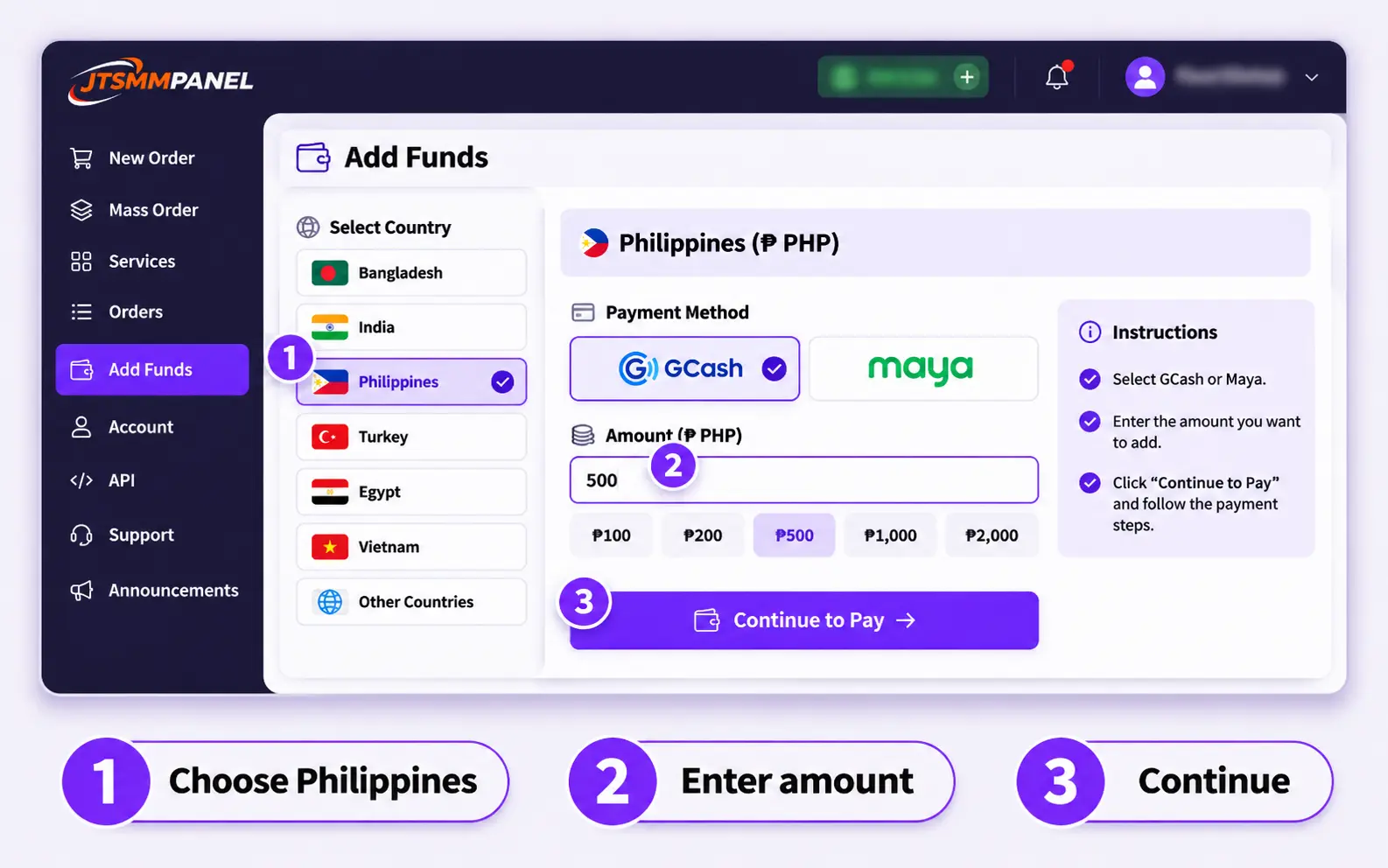
To pay for an SMM panel with GCash or Maya, log in, open Add Funds, choose the Philippines payment option, enter your amount and approve the payment in your wallet app. Automatic payments usually reach your panel balance within a few minutes. Then use that balance to order any service.
You needA panel account and a verified wallet
MinimumShown on the Add Funds page
Arrives inInstantly to a few minutes on automatic
PricesIn USD, converted at the page rate
GCash and Maya Payment Options on an SMM Panel
An SMM panel works like a prepaid wallet. You add money first, and each order is deducted from that balance. You do not pay separately for every order, and you never type your GCash or Maya details into an order form.
On JTSMMPANEL, Filipino users have two ways to add funds. Pick one before you open your wallet app.
Best for most people
Automatic: Philippines option
Listed as "Gcash / Maya + More Philippines". The payment goes through a gateway, and the balance updates by itself.
Works with GCash and Maya
No proof to submit in normal cases
Usually done in a few minutes
Use as a backup
Manual: GCash transfer
Listed as "Manual - Gcash". You send money to the account shown on the page, then give the transaction details.
GCash only
You must keep and enter your reference details
Needs a manual check, so it can take longer
How to Add Funds with GCash or Maya: Automatic Method
Have your wallet app open and your balance ready. These five steps take about two minutes.
Choose the Philippines option on the Add Funds page, then enter your amount.
Log in and open Add Funds
Sign in to your account and open Add Funds from the menu. New here? Create a free account first.
Select the Philippines payment option
Choose "Gcash / Maya + More Philippines". The page then shows that method's instructions, minimum amount and exchange rate. Read them, because they can change.
Enter your amount
New users should start with a small amount and test one service. You can always add more later.
Pay in GCash or Maya
Follow the payment screen. If it shows a QR code, scan it with your wallet app. Paying on one phone? GCash lets you save the QR image and upload it from your gallery in the app's scanner. Check the amount and merchant name, then approve.
Check your balance
Go back to the panel and refresh. Your balance should update within a few minutes. Keep your wallet receipt until you see the funds.
How to Pay with Manual GCash
Use this only if the automatic option is unavailable or the page asks you to use it.
Select "Manual - Gcash"
Open Add Funds, choose the manual method and read the instructions on that screen. They show the current account details and minimum amount.
Send the exact amount
Send only to the details shown inside your logged-in Add Funds page. Double-check the amount before you approve. GCash says GCash-to-GCash QR transfers are free, while transfers from banks or other wallets can carry an InstaPay fee.
Save your receipt
Screenshot the confirmation so you have the reference number, amount, date and time.
Submit the transaction details
Enter what the form asks for, usually the transaction ID, and submit once. Sending the same details again will not speed up the check.
GCash vs Maya: Which Should You Use?
If both work for you, use the wallet that already has enough balance and the higher verification level. Failed payments are often caused by wallet limits, not by the panel.
Check this
GCash
Maya
Automatic on JTSMMPANEL
Yes, through the Philippines option
Yes, through the Philippines option
Manual option
Yes
No separate manual option
Verification
Fully Verified is needed for features such as Express Send
Upgrade with a valid ID and video selfie for higher limits
Wallet limit
Commonly listed as ₱100,000 for Fully Verified accounts
₱50,000 Basic, ₱100,000 Upgraded, ₱500,000 Super User
Where to check
Your limits inside the GCash app
Your profile limits inside the Maya app
Wallet limits were checked in November 2026 and can change. Your app always shows your current limit.
How Pesos Become Panel Balance
Service prices are listed in US dollars per 1,000 units, but you pay in pesos. The Add Funds page converts your payment at the rate it shows at that time.
Example with a sample rate₱500 ÷ ₱58 per $1 = about $8.62 balance$0.50 per 1,000 × 2,000 units = $1.00 order
₱58 is only an example. Use the live rate on your Add Funds page and the live price on the services page.
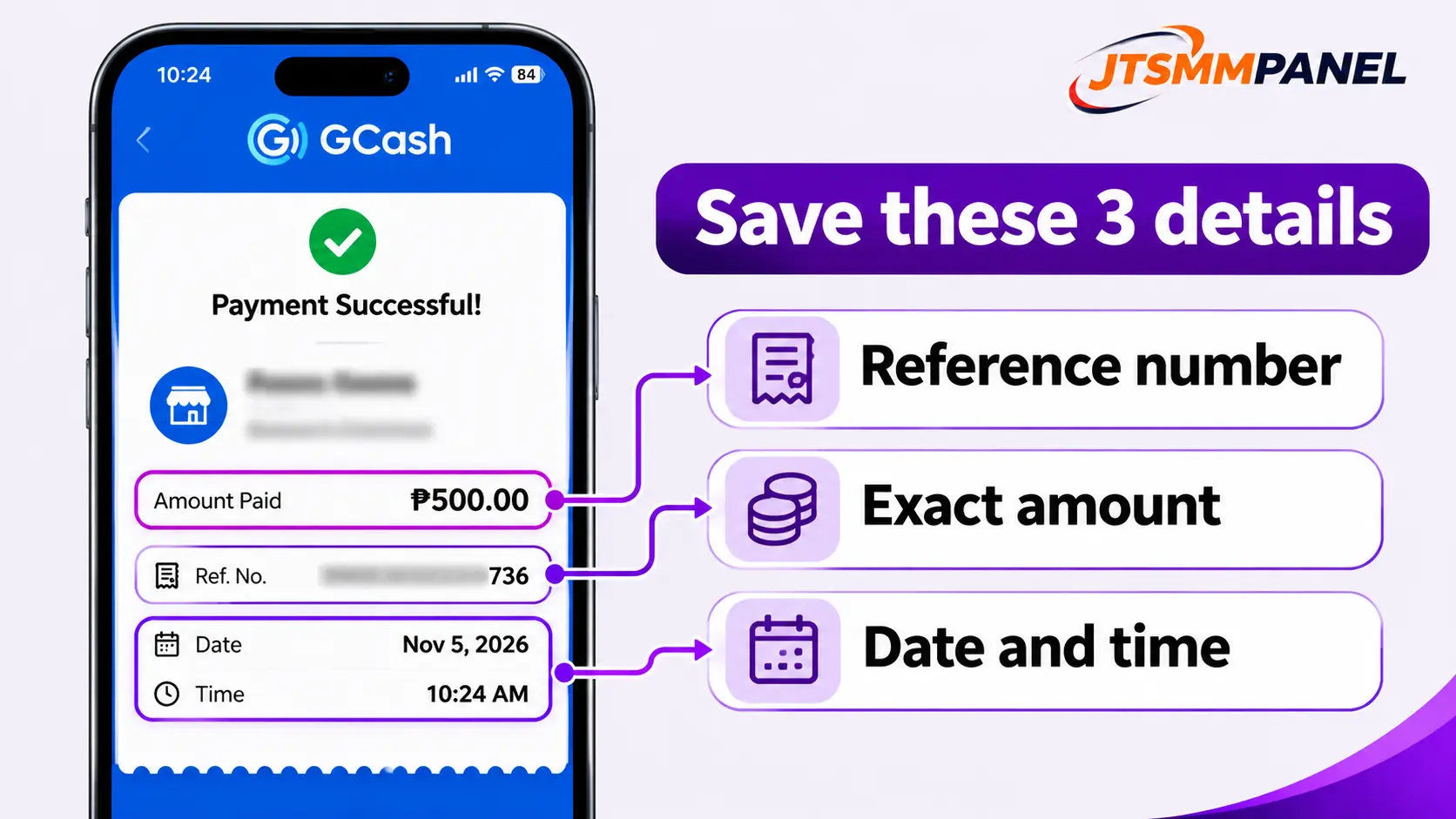
Save These Details After Every Payment
This small habit fixes most payment problems quickly. If something goes wrong, support needs these details to find your payment.
Your payment record
WalletGCash or Maya
Reference no.From your wallet receipt
AmountExact peso amount
Date and timeFrom your wallet receipt
Panel usernameThe account you topped up
ProofFull receipt screenshot
The reference number, amount and time are the details support needs. Keep your personal details private.
GCash or Maya Payment Not Showing? Fixes
Paid, but no balance after a few minutes
Check your wallet history first. If the money left your wallet, refresh the panel, then open a support ticket with your receipt. Do not pay again.
QR code will not scan
Raise your screen brightness, or save the QR and upload it in your wallet's scanner. If it still fails, start a new payment from Add Funds.
Payment declined or over the limit
Check your balance and wallet limit. Try a smaller amount, verify your wallet for a higher limit, or use your other wallet.
Charged twice
Screenshot both transactions. Report the double charge in your wallet's help center, and open a panel ticket with both reference numbers.
You cannot see the GCash or Maya option
Check that you are logged in. Available methods depend on the live payment setup, so ask support which option to use today.
You sent the wrong amount by manual GCash
Do not send a second payment to balance it out. Open a ticket with the receipt and explain what happened.
Stay safe: never share your MPIN, password or one-time code with anyone, including people who claim to be panel support. Take payment details only from your logged-in Add Funds page, not from a stranger in a Facebook or Telegram chat. Your social media password is never needed for an order either.
What to Do After Your Funds Arrive
Start with a small test order so you can check speed and quality before spending more. These pages can help:
Yes, if the panel offers it. On JTSMMPANEL you can use the automatic Philippines option or the manual GCash option on the Add Funds page. Your payment becomes panel balance, which you then use to place orders.
Can I use Maya to add funds to an SMM panel?
Yes. On JTSMMPANEL, Maya is covered by the automatic "Gcash / Maya + More Philippines" option. There is no separate manual Maya option.
How long does a GCash or Maya deposit take?
Automatic payments usually arrive instantly or within a few minutes. Manual GCash payments need a check, so they can take longer. If your payment does not appear, open a ticket with your transaction ID.
What is the minimum deposit with GCash or Maya?
It depends on the payment method and can change, so check the amount shown on the Add Funds page. Most local wallets accept small top-ups, which lets you test a service before adding more.
Are SMM panel prices in pesos?
Prices on JTSMMPANEL are listed in US dollars per 1,000 units. When you pay with GCash or Maya, your pesos are converted at the rate shown on the Add Funds page.
What should I do if I paid but my balance did not update?
Check that the money left your wallet, wait a few minutes and refresh the panel. If the balance still has not changed, open a support ticket with your receipt, reference number, amount and time. Do not pay again.
Can I get my GCash or Maya deposit refunded?
Undelivered or partly delivered orders are refunded to your JTSMMPANEL balance automatically. Refunds back to your payment method follow our refund policy.
Do I need a verified GCash or Maya account?
A higher verification level gives you higher limits and fewer failed payments. Some features need it, such as GCash Express Send, which is only for Fully Verified accounts.
To grow on X (Twitter) from zero, pick one clear topic, set up a profile that explains it in five seconds, post every day, and spend as much time replying to bigger accounts as you do posting. Followers come from being seen by the right people, not from posting into an empty room. This guide gives you a simple 30-day plan, the post formats that work, the mistakes that keep new accounts stuck at 50 followers, and where an SMM panel can safely help.
Why Growing on X From Zero Feels So Hard
When you have 0 followers, nobody sees your posts. Nobody likes them, so the platform has no signal that they are worth showing. That loop is the real problem, and it is why most new accounts quit in the first two weeks.
The way out is to borrow attention first, then earn your own. You show up where people already are (replies under active accounts in your niche), give them a reason to click your profile, and make sure the profile turns that click into a follow.
Pick One Niche and One Audience
"I post about life, tech, football and business" gives nobody a reason to follow. Finish this sentence instead:
"I help [specific people] with [specific topic]."
Good examples: "I help Bangladeshi freelancers get international clients", "I share daily AI tools for small shops", "I post football tactics in simple words". If you can't finish the sentence, you are not ready to post yet.
Set Up a Profile That Converts Visitors Into Followers
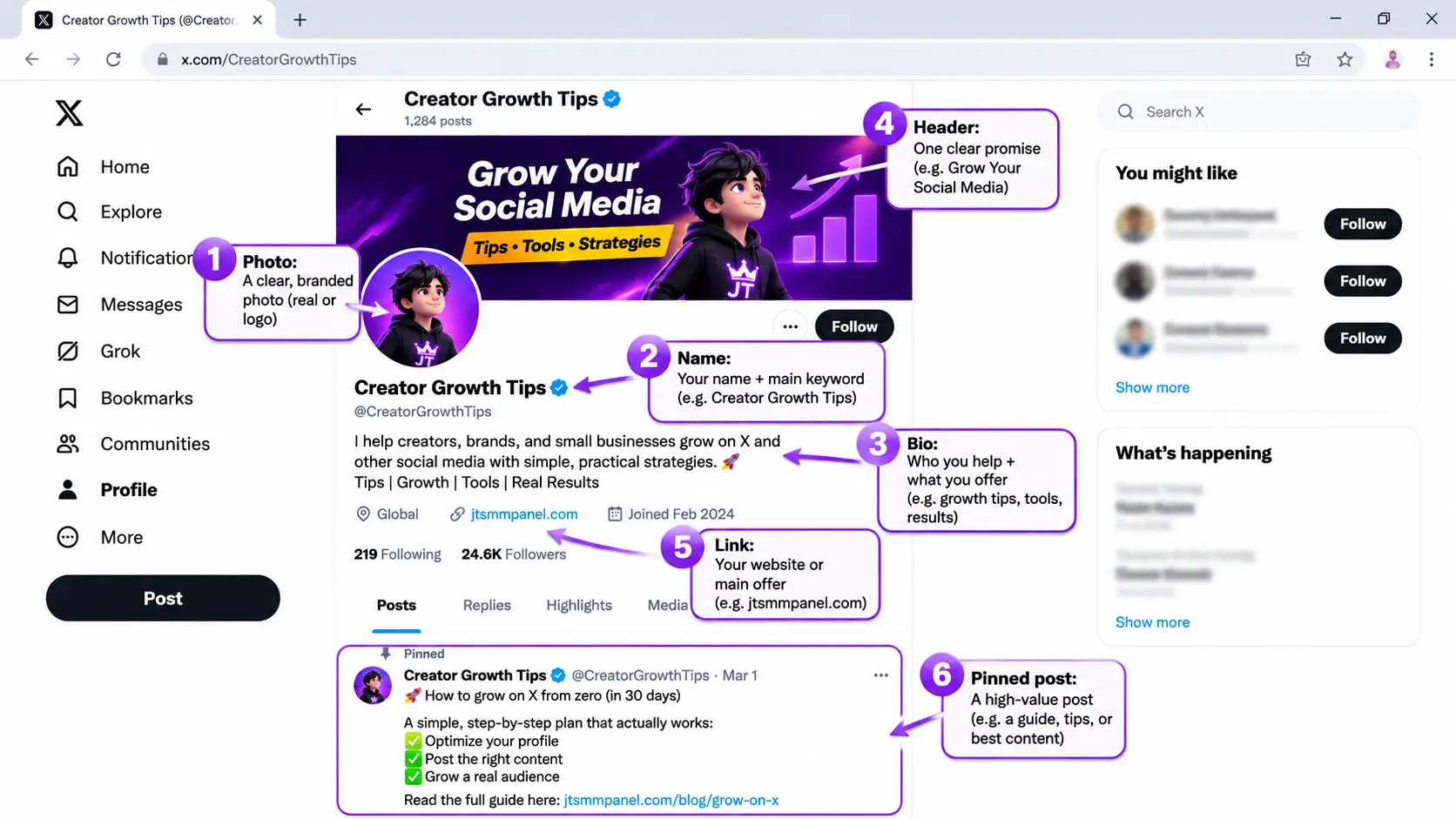
Every reply you write sends people to your profile. You have about five seconds to convince them.
Part
What to do
Profile photo
A clear face photo or a clean logo. Avoid the default egg and avoid group photos.
Name
Your real name or brand name plus a keyword, for example "Rafi | Freelance Tips".
Bio
Who you help, what they get, and one proof point. No hashtag spam.
Header image
One promise in plain words, like "Daily freelance tips from Dhaka".
Link
One link only: your website, newsletter or main product.
Pinned post
Your best thread or a short "start here" post that shows what you offer.
The six parts every visitor judges in five seconds.
Reply Before You Post
Replies are the fastest growth tool for a small account. A reply under a post with 50,000 views can show your name to thousands of people, while your own post may reach only a handful.
Make a list of 20 to 30 accounts in your niche that post often and get real replies.
Turn on notifications for the 10 most active ones, so you can reply in the first minutes.
Add something new: a short example, a number, a different view or a useful question. "Great post!" gets ignored.
Keep it short and easy to read on a phone. Two or three lines is enough.
Reply 10 to 20 times a day for the first month. This is the habit that makes the biggest difference.
Post a Steady Mix of Formats
Don't just post opinions. Rotate between a few formats and watch which one your audience reacts to.
Format
Why it works
Example
Short tip
Easy to read, easy to like and save
"3 words to remove from every cold email"
Thread
Builds trust and gets followed from the profile
"How I got my first 3 clients, step by step"
Story
People remember stories more than advice
"I lost a client last week. Here is what I learned"
Question
Invites replies, which the platform counts as strong engagement
"Which tool do you use to schedule posts?"
Image or screenshot
Stops the scroll and proves the result
A before and after of a design or a dashboard
Short video
Gets extra reach and shows your face
A 30-second tip to camera
How to Write the First Line
Most people read only the first line and decide. Start with a result, a number or a clear problem. Compare:
Weak: "Some thoughts about freelancing."
Strong: "I got my first $100 client in 9 days. Here is exactly what I sent."
Follow a Simple 30-Day Plan
Week
Daily routine
Goal
Week 1
Set up profile, write 5 to 10 posts, reply 10 times a day
Profile ready, first 50 followers
Week 2
1 to 2 posts, 15 replies, follow 10 relevant people
Find which posts get replies
Week 3
2 posts, 1 thread, 15 to 20 replies
First post with 1,000+ views
Week 4
Repeat the best format, pin your best thread, reply to everyone
200 to 500 followers
These are targets, not promises. Results depend on your niche, how often you reply, and how good your content is.
When Is the Best Time to Post?
There's no perfect hour for everyone. Post when your own audience is awake. If your followers are in Bangladesh, evenings (7 to 10 PM) and early mornings often work well. If you target the US or UK, check where your replies come from and test two time slots for a week each. Your analytics will show the answer faster than any generic list.
Common Mistakes That Keep Accounts Stuck
Posting and disappearing. If you do not reply to comments in the first hour, the post dies.
Follow and unfollow. It can get the account limited, and the followers you get are not interested in you.
Too many hashtags. One or none is enough. Hashtag walls look like spam.
Only promoting. If every post says "buy my service", people stop reading.
Copying big accounts. Share your own examples and experience.
Quitting at week two. Most accounts take 4 to 8 weeks before the numbers move.
Where an SMM Panel Fits In
A new account with 12 followers looks risky to a visitor, even when the content is good. That is where many creators and small businesses use an SMM panel: to add some social proof so the profile looks active, while the real growth comes from the content and replies above.
If you do use a panel, follow these rules:
Start small. Order a few hundred followers or some post engagement, not tens of thousands overnight.
Use drip-feed. Spreading delivery over days looks more natural than a sudden jump. See our drip-feed page.
Choose services with refill. Some followers drop over time, and a refill guarantee replaces them. Read refill and drop explained first.
Keep posting real content. Followers and likes only help if there is something worth seeing on the profile.
Never share your password. A good panel only needs your profile or post link.
How to Measure Your Progress
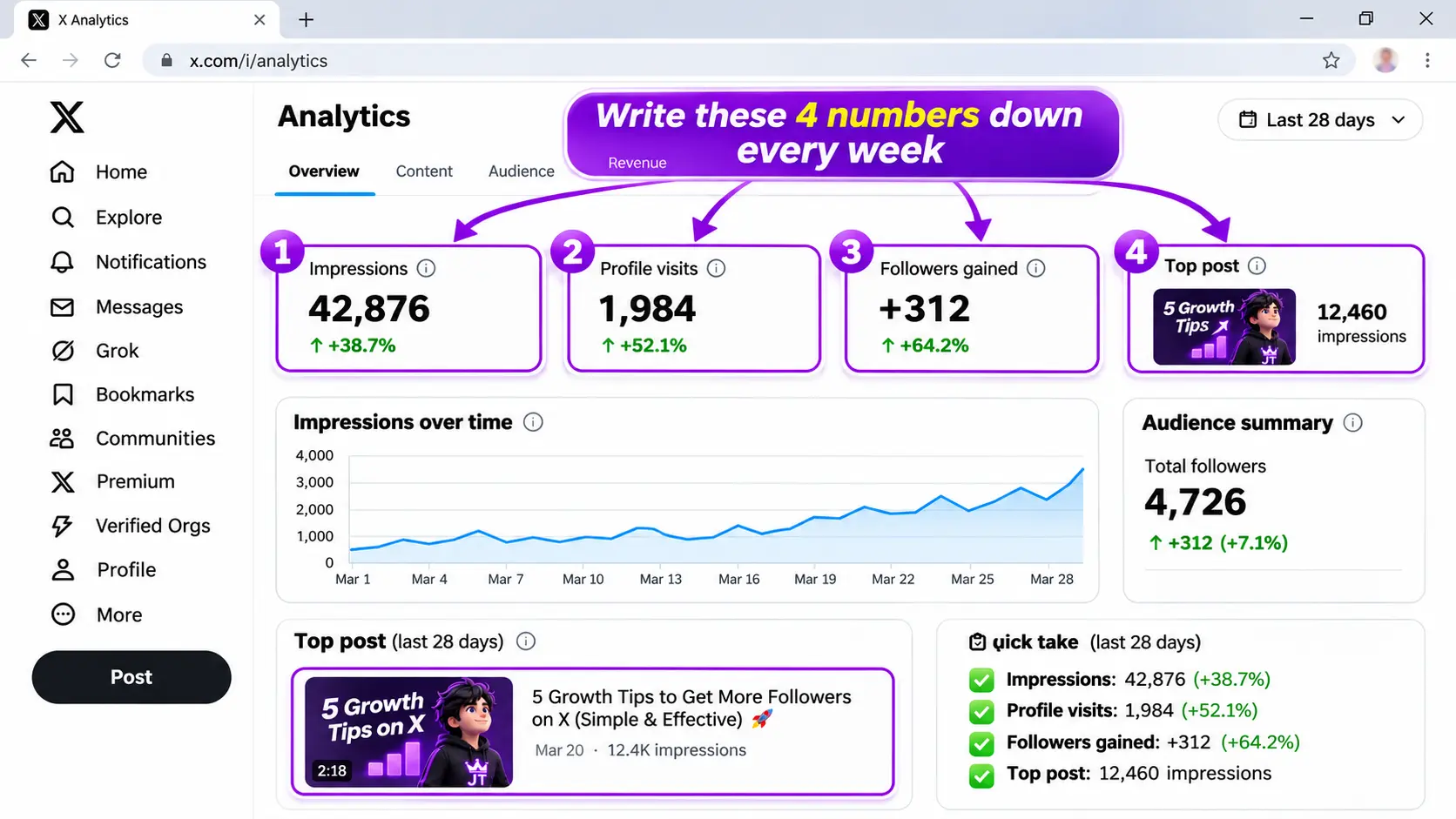
Check these four numbers once a week.
Open the analytics on your account once a week and write down four numbers: followers gained, profile visits, impressions and your best post. Then ask one question: what did my top three posts have in common? Repeat that format and drop the one that never works. This weekly check beats any "growth hack".
Frequently Asked Questions
How long does it take to grow on X from zero?
With daily posting and 10 to 20 replies a day, most people see their first real traction in 3 to 6 weeks. Reaching 1,000 followers usually takes a few months of steady work.
How many times a day should I post on X?
One to three posts a day is a good start for a small account. Consistency matters more than volume, so choose a number you can keep up for months.
Do replies really help me grow faster than posts?
Yes, for new accounts. A reply under an active post borrows that post's audience, while your own post is shown to almost nobody until you have followers.
Should I use hashtags on X?
Rarely. One relevant hashtag or none is enough. Clear wording and a strong first line do more for reach than a list of tags.
Is it safe to buy X followers from an SMM panel?
Buying a small amount from a reliable panel, delivered slowly with refill, is commonly used for social proof. Avoid huge sudden orders, and never give out your password.
Do I need X Premium to grow?
No. You can grow without it. Premium may give extra reach on replies and posts, so some creators try it later once they have a posting habit, but it will not fix weak content.
Why am I not getting followers even though I post every day?
Usually the profile does not explain who you help, the posts cover too many topics, or you are not replying to anyone. Fix the profile first, then add 10 to 20 daily replies.
Is an SMM panel safe for YouTube? It is safe for your login, because a good panel only needs your public video or channel link. It is not risk-free for your channel. YouTube's fake engagement policy says artificial traffic is not counted, spam subscribers are removed, and even a service you hire can get your content removed or earn you a strike. The biggest risk is monetization: bought watch hours are not "qualified" hours, and YouTube reviews every channel before it joins the Partner Program. This guide explains each risk in plain words, which services are riskier than others, and how to stay as safe as possible.
Is an SMM Panel Safe for YouTube? The Short Answer
Most people who ask "is an SMM panel safe for YouTube" are really asking three questions. Can my channel get banned? Will the views or subscribers stay? And will this help me get monetized? The honest answers are: a ban is unlikely for a small, careful order but possible if you break the rules again and again; some of what you buy will drop; and no, bought watch time will not help you get monetized and can actually block you.
YouTube is stricter than Instagram or Facebook about numbers, because those numbers are tied to money. Advertisers pay for real viewers, so YouTube spends a lot of effort checking every view, subscriber and watch hour. That does not mean every order from a panel leads to a strike. It means YouTube decides what counts, and anything that looks artificial can be removed from your totals without warning.
We run an SMM panel, so we could tell you everything is 100% safe. We won't, because that is not true for any panel. Since 2020, JTSMMPANEL has processed more than 1.9M orders, and the customers who stay happy are the ones who know the risks before they order. Here is what really happens, one risk at a time.
How an SMM Panel Works With a YouTube Channel
An SMM panel is a website where you order social media services such as views, likes, comments or subscribers. For YouTube, you paste the public link of a video or your channel, choose a service and a quantity, and the panel delivers it over a period of time. You never connect your Google account, and nothing is installed on your channel.
The quality depends on the service. Some views come from real devices and traffic sources, some from lower-quality networks. Some services keep viewers on the video for a while, some do not. That is why two YouTube services with the same name can behave very differently, and why the price usually tells you a lot about the quality. Our YouTube SMM panel page lists the services we offer and their refill periods.
Your Google Login Stays Private
This is the part of "is an SMM panel safe for YouTube" that you can fully control. A real panel only needs a public link. If any site, app or seller asks for your Google password, a sign-in code, or access to YouTube Studio, stop right there. That is how channels get hacked, renamed and used for crypto scams, and hacked channels are much harder to recover than lost views.
Keep two-step verification on for your Google account, and do not sign in to unknown "free subscriber" apps with Google. Those apps often use your account to subscribe to other channels, which is exactly the kind of activity YouTube's systems look for.
YouTube Filters Fake Views
YouTube's fake engagement policy is clear that artificial traffic does not count. When its systems decide that views came from bots, scripts or other low-quality sources, those views are not added to your total, or are taken away later. This is why you sometimes see a view counter slow down, stop for a while or even go down after an order.
For you, this means two things. First, cheap views often look great for a day and then shrink, because YouTube removes the ones it does not trust. Second, a drop in views is usually not a penalty in itself. It is YouTube cleaning the number. A penalty is something different, such as a warning email or a removed video, which we cover in step 7.
Views that come with refill can be topped up if they drop inside the refill period. Our guide SMM Panel Refill and Drop Explained explains how refill works and why no honest panel can promise zero drop.
Watch Time and Monetization: The Biggest Risk
This is the most important part of the guide. Many people search for "buy 4000 hours watch time" because the YouTube Partner Program (YPP) asks for 1,000 subscribers plus 4,000 public watch hours in the last 12 months, or 10 million public Shorts views in the last 90 days. The lower tier for fan funding and Shopping asks for 500 subscribers, 3 recent uploads and 3,000 watch hours or 3 million Shorts views. YouTube calls these "qualified" watch hours and "valid" uploads, and the exact numbers can change, so check the Earn tab in YouTube Studio for your country.
Here is the problem. YouTube says it reviews every channel before accepting it into YPP, and keeps reviewing channels after they join. Artificial traffic is not counted, so bought hours may never show up as qualified hours. Worse, a channel that reached the threshold with a big block of bought watch time is exactly what reviewers look for. The result can be a rejected application, a long wait before you can apply again, or losing monetization later.
So our advice is simple: do not buy watch time to get monetized. It is the riskiest YouTube service there is, and the one with the most to lose. If you are close to the threshold, spend that money on better thumbnails, a stronger first 30 seconds, or YouTube's own Promote tool, which YouTube treats as legitimate promotion.
Subscribers Drop When YouTube Removes Spam
YouTube removes spam subscribers and closed accounts from your total. Its help pages also say that subscriber numbers in YouTube Analytics run about 48 hours behind the public count, partly so spam can be checked. That is why some people see subscribers arrive, then a part of them vanish two days later.
Bought subscribers are the most likely to drop, because they often come from accounts with little history. Even good services see some drop over time. If you order subscribers, choose a service with refill, keep the amount small compared with your real audience, and expect some loss. If the drop happens inside the refill period, press the refill button on your Orders page, or open a support ticket with the order ID.
Also remember that bought subscribers do not watch your new videos. A channel with 10,000 subscribers and 50 views per video looks worse to viewers, and to YouTube, than a channel with 1,000 subscribers and 800 views.
Speed: Why Thousands of Views in an Hour Look Wrong
Real videos grow in waves: a push when you publish, smaller bumps when YouTube suggests the video, and a long, slow tail from search. Ten thousand views in one hour on a video with no shares, no comments and no traffic sources looks very different from that pattern.
That is why speed matters. A service that delivers slowly over days, or a drip-feed order that splits one order into small parts over time, looks more like normal growth than a sudden jump. It also gives the panel time to replace drops. Slow is not a guarantee of safety, but fast is almost always riskier.
If an order seems stuck or slower than expected, read why SMM panel orders stay pending before you place a second order on the same link, because two orders on one link at once can cause problems.
Retention and the Algorithm
YouTube does not only count views. It looks at how long people watch, whether they click, and what they do after. Those signals help decide who sees your video next. Views that leave after a few seconds do not tell YouTube that your video is good. In many cases they just make the numbers harder to read.
This is also why bought views rarely turn into real growth by themselves. The algorithm wants to know which real audience enjoys your video. If a big part of the traffic does not behave like your real viewers, your analytics become messy, and it is harder for you to learn what works.
If you use a panel, treat it as a small push for a video that is already good: clear title, strong thumbnail, a hook in the first seconds. The content still has to do the real work.
YouTube's Rules: Warnings, Strikes and Termination
YouTube's fake engagement policy covers anything that artificially increases views, likes, comments or other numbers. It names viewbotting live streams, "sub4sub" offers, and promoting or linking to services that sell views or subscribers. It also says that if you hire someone to promote your channel, their methods can affect your channel too.
Here is how YouTube says enforcement usually works. The first time, you usually get a warning with no penalty to the channel, and you can take a short policy training so the warning expires after 90 days. If you break the same policy again within those 90 days, you can get a strike. Three strikes in 90 days can end the channel. A single case of severe abuse, or a channel made only for fake engagement, can be removed without the usual steps.
Two practical points come out of this. Never mention, link or show a panel inside your videos, descriptions, comments or community posts, because that alone breaks the policy. And if you ever get a warning, stop all orders on that channel and take the training. It is not worth risking a strike for a few extra views.
Scam Panels and Payment Safety
The last risk has nothing to do with YouTube. Some "panels" take your money and deliver nothing, or deliver bot traffic from the worst sources and disappear. A cheap price means nothing if the order never finishes.
Before you add funds, check that the panel has real support, a clear refill and refund policy, and a working order history. Start with a small deposit and one small order. Our guide How to Choose the Best SMM Panel has a 12-point checklist you can use on any panel, including ours.
Which YouTube Services Are Riskiest?
Not every YouTube service carries the same risk. This table is based on what YouTube's policy says and what we see across many orders. It is a guide, not a promise.
Service
Risk level
Why
Likes on a video
Lower
Small amounts look normal, but likes can still drop
Views on a regular video
Medium
Low-quality views are filtered and the count can freeze or drop
Shorts views
Medium
Filtered like normal views, and they do not count toward Shorts monetization
Comments
Medium
Generic comments look fake and can be held or removed as spam
Subscribers
High
Spam subscribers are removed, and big drops are common
Live stream viewers
High
Viewbotting live streams is named in YouTube's policy
Watch time for monetization
Highest
Not qualified watch time, and channels are reviewed before YPP
Risk also depends on your channel. A new channel with three videos and 20,000 bought views stands out much more than an active channel with real viewers.
A Step-by-Step Safe Test Before You Order More
Pick one video that is already good. Use a public video with a clear title and thumbnail, not a brand new empty channel.
Choose a refill service. Check the refill period in the service name or description before you order.
Start small. Order a small amount compared with the views or subscribers you already have.
Use a slow speed or drip-feed. Spread the order over days instead of hours.
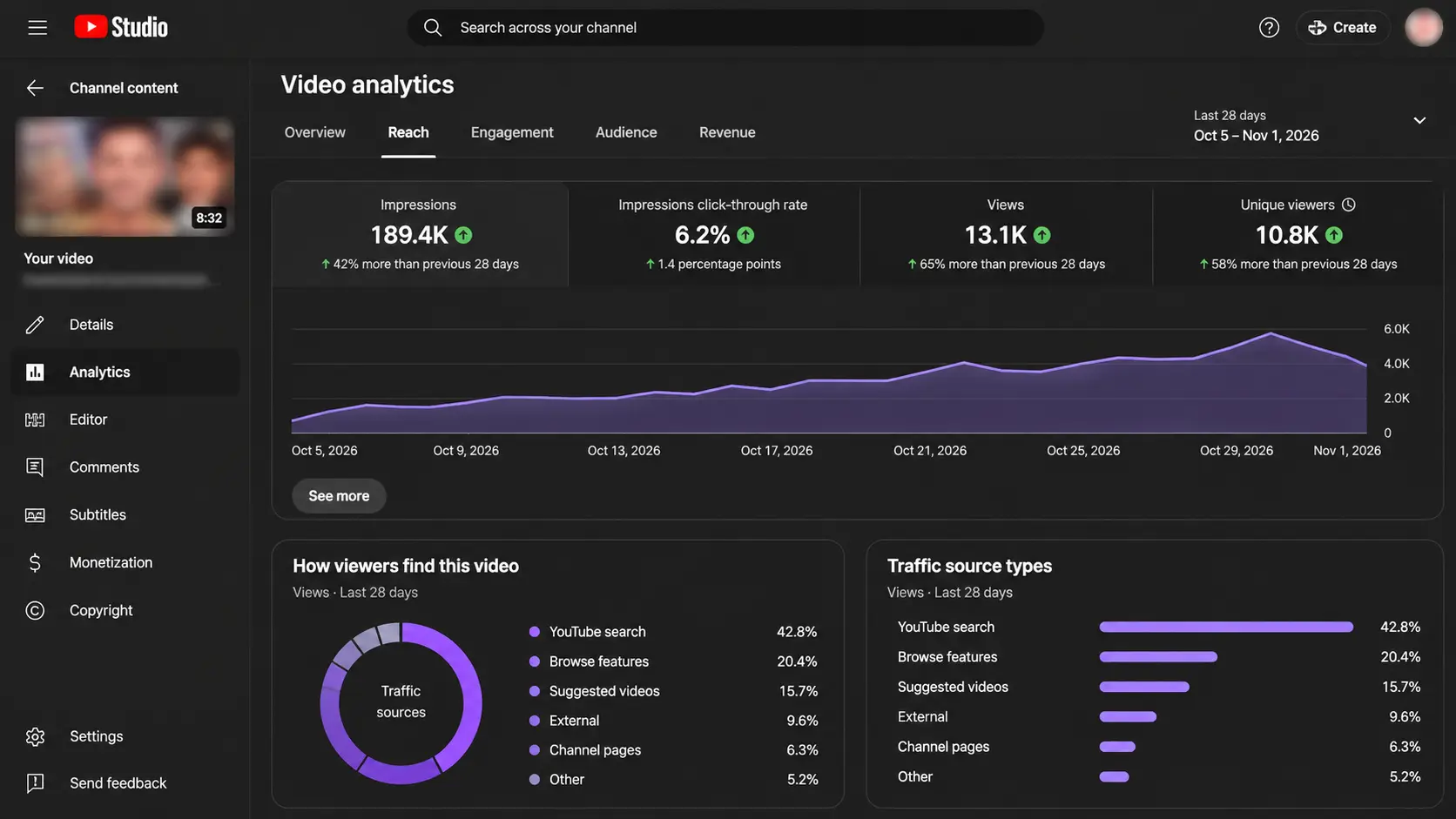
Watch YouTube Studio for a week. Check traffic sources, retention and any emails from YouTube.
Keep the order private. Never mention the panel on your channel, in comments or in descriptions.
Stop at any warning. If YouTube sends a warning, stop all orders on that channel and complete the training.
Red Flags of an Unsafe YouTube Service
It asks for your Google login or YouTube Studio access. No real service needs that.
"4000 hours, guaranteed monetization." No one can promise YPP approval. YouTube decides after a review.
"100% real, never drop" subscribers at a very low price. Only YouTube decides which accounts stay.
Huge amounts delivered in minutes. Speed is one of the clearest signs of artificial traffic.
No refill, no support and no order history. If something goes wrong, you have no one to ask.
Live viewer bots for your stream. This is one of the examples YouTube names directly in its policy.
What to Do If Something Goes Wrong
Views or subscribers dropped: if you are inside the refill period, press refill on your Orders page or open a ticket with the order ID. If the service had no refill, the drop will not be replaced, so choose a refill service next time.
YouTube sent a warning: stop every order on that channel, read the email carefully, and complete the policy training so the warning can expire after 90 days. Do not place any new order during that time.
Your YPP application was rejected: read the reason in YouTube Studio, wait for the reapply date, and focus on real growth in the meantime. Do not try to "fix" it with more bought watch time.
Final Thoughts: Is an SMM Panel Safe for YouTube?
An SMM panel is safe for YouTube in one way: a good one never touches your login. Beyond that, the honest answer is that it carries real risk. YouTube filters fake views, removes spam subscribers, reviews channels before monetization, and can warn or strike channels that use artificial traffic, even through a service they hired. Watch time for monetization is the one service we tell everyone to avoid.
If you still decide to use a panel, do it the careful way: small refill orders, slow delivery, good content first, nothing promoted on YouTube, and stop at the first warning. You can compare our services and refill periods on the YouTube SMM panel page and the full service list before you decide.
Frequently Asked Questions
Is an SMM panel safe for YouTube?
It is safe for your login, because a good panel only needs a public link. It is not risk-free for your channel. YouTube does not count artificial traffic, removes spam subscribers, and can warn or strike channels that use fake engagement, even through a hired service.
Can YouTube ban my channel for buying views?
The first violation usually brings a warning with no penalty to the channel. Repeating it within 90 days can lead to a strike, and three strikes in 90 days can end the channel. Severe or repeated abuse can be removed faster.
Does bought watch time count for YouTube monetization?
No. YouTube only counts qualified watch hours and reviews every channel before it joins the Partner Program. Bought watch time can lead to a rejected application or lost monetization, so we advise never to buy it for that purpose.
Why are my YouTube views or subscribers dropping after an order?
YouTube filters views it does not trust and removes spam or closed accounts from subscriber totals. Some drop is normal. If the service has refill, request a refill inside the refill period.
Which YouTube service is safest to buy?
Small amounts of likes or views on a good public video, with refill and slow delivery, carry the lowest risk. Subscribers, live viewers and watch time for monetization carry the highest risk.
Does YouTube know if I use an SMM panel?
YouTube cannot see your panel account, but it can see traffic patterns on your video. Very fast, low-quality traffic is easy for its systems to spot and filter, which is why slow, small, refill orders are the careful choice.
If your Instagram followers are decreasing automatically, it is almost always because Instagram is removing fake, inactive or deleted accounts, or because real people are slowly unfollowing. A loss of a few followers a day, or 1 to 3% in a month, is normal for almost every account. A sudden drop of 10% or more usually means a platform cleanup or low-quality followers. This guide explains every common reason, how to tell which one is affecting you, and what you can actually do about it.
Why Are My Instagram Followers Decreasing Automatically?
When people say their Instagram followers are decreasing "automatically", they usually mean the number goes down even though they did nothing different. You open the app in the morning and you have 20 fewer followers than last night. Or you notice that you have been stuck at the same number for weeks, even though you can see new people following you.
The reason is simple: your follower count is not a fixed number. It is a live total of all the accounts that follow you right now. Every day, some of those accounts are deleted, some are deactivated, some are removed by Instagram, and some real people decide to unfollow. At the same time, new people find you and follow. The number you see is the result of both sides. When new followers slow down, the losses that were always there become visible.
So the first thing to understand is that a falling count is not always a problem with your account. Often it is a sign that Instagram is cleaning up its network, which in the long run makes your audience more real. But sometimes it is a sign that your content, your growth method or the followers you got are the problem. The sections below go through each reason one by one, from the most common to the least.
Instagram Removes Fake and Inactive Accounts
This is the number one reason for Instagram followers decreasing, and it affects everyone, including big celebrities. Instagram and Meta constantly look for fake accounts, spam bots and accounts that break the rules. When those accounts are removed or disabled, every follow they made disappears at the same moment. If 30 of your followers were bots and Instagram removes them today, you lose 30 followers today, even though no real person unfollowed you.
These cleanups do not happen at a fixed time. Sometimes they are small and spread over weeks, so you lose a few followers a day. Sometimes Instagram runs a bigger sweep and many accounts lose hundreds or thousands of followers in a day or two. When that happens, you will often see other creators talking about it at the same time, which is a good clue that the drop is not about you.
You cannot stop this, and you should not want to. Bot followers never see your posts, never like or buy anything, and they make your engagement rate look worse. Losing them is not a real loss. It just makes your number more honest.
People Deactivate or Delete Their Accounts
Not every lost follower was fake. Real people also leave Instagram, take a break or close an old account. When someone temporarily deactivates their account, they disappear from your follower list until they log back in. When they delete it, they are gone for good.
This is especially common around exam periods, holidays and the new year, when many people take a social media break. It also happens when people move to a new account and stop using the old one. In those cases, some of your "lost" followers may come back on their own after a few weeks, which explains why some accounts see their number go down and up again without any clear reason.
There is nothing to fix here. It is normal life on any social network. Just know that a small, steady loss is part of the background, and your goal is to gain faster than that background loss.
Follow-for-Follow and Follow-Unfollow Accounts
If you ever grew by following lots of people and hoping they follow back, or by joining "follow for follow" groups, a part of your audience is not really interested in your content. Many of these accounts follow you only to get a follow back, and then unfollow after a few days or weeks. Some use apps to follow and unfollow thousands of accounts automatically.
The result is a slow, steady leak. You gain followers quickly while you are active in these groups, then the number slides down when you stop. It feels like your Instagram followers are decreasing for no reason, but in fact the "growth" was never stable in the first place.
The fix is to stop relying on follow-back growth. It also helps to avoid following and unfollowing large numbers of accounts yourself, because Instagram can limit accounts that do this too often. Real followers who chose you because of your content are much less likely to leave.
Low-Quality Bought Followers Are Dropping
If you have bought followers from any service, a part of them may now be dropping. Cheap followers usually come from newer or empty accounts, and those are exactly the accounts Instagram removes first. This is why a cheap order can look great on day one and lose a large part of its followers in the next weeks.
We run an SMM panel, so we see this side of the story every day. Since 2020, JTSMMPANEL has processed more than 1.9M orders, and the pattern is always the same: the cheaper and faster the service, the higher the drop. That is why we always tell buyers to look for services with refill, which means the missing amount is sent again for free within a set period. Our guide SMM Panel Refill and Drop Explained covers labels like R30 and "non-drop" in detail, and why no honest panel can promise zero drop.
If you used a panel and your followers dropped inside the refill period, open your Orders page and press the refill button on that order. If there is no button or something looks wrong, open a support ticket with the order ID. If the service had no refill, the drop will not be replaced, so choose a refill service next time and start with a small test.
Your Content Changed or Slowed Down
Real people unfollow when an account stops giving them what they followed it for. This is the reason most creators do not want to hear, but it is very common. If you started as a food page and now post mostly memes, many of your early followers will leave. If you used to post every day and now post once a month, people forget who you are, and when your post finally shows up, they unfollow because they do not recognize you.
The opposite can also happen. Posting too much in a short time, such as ten stories in a row every hour or many similar posts in one day, can annoy people and push them to unfollow or mute you. Heavy promotion has the same effect. If every post is a sales message, followers who came for value will slowly leave.
Look at your last month honestly. Did you change your topic, your posting schedule or your style? Did the drop start around the same time? If yes, the fix is not technical. It is about going back to a clear topic and a steady, realistic schedule that you can keep.
A Glitch or Delayed Count
Sometimes the number itself is wrong for a short time. Many people search for "Instagram followers decreasing glitch" because they see the count jump down and then back up, or see different numbers on the app and on the website. Instagram's systems update counts in the background, and during big updates or server problems the number shown can lag behind the real total.
A good way to check is to look at your account from two places: the app on your phone and instagram.com in a browser, or ask a friend to open your profile. If the numbers are different, or if the count goes back to normal within a day or two, it was a display issue, not a real loss. Updating the app and clearing its cache (on Android) can also fix a count that seems stuck.
If the lower number stays the same everywhere for several days, then it is a real change, and one of the other reasons in this guide is the likely cause.
Third-Party Apps and Old Connections Were Removed
Some accounts once used apps that promised free followers, likes or "who unfollowed me" reports. Many of these apps ask you to log in with Instagram. When Instagram blocks these apps, or when the app's network of accounts is removed, the followers you got through them can disappear together. At the same time, any account that the app controlled can be removed, which reduces your count again.
Check your connected apps in Instagram under Settings, then Apps and websites (the exact name can change between app versions). Remove anything you do not use or do not trust. Never give your Instagram password to a growth app. A real growth service, such as an SMM panel, only needs your public profile or post link. If something asks for your login, it is a risk to your account, not a growth tool.
After removing these apps, you may lose a few more followers at first. That is fine. It is better to have a smaller, real audience than a big one that can vanish any time.
Your Reach Dropped, So Losses Show More
Sometimes the problem is not that you lose more followers than before. It is that you gain fewer. Every account always has some unfollows in the background. When your posts reach many new people, new follows hide those losses. When your reach drops, the background losses become bigger than your gains, and the total goes down.
Reach can drop for many reasons: a change in the algorithm, fewer Reels, older content formats, or a warning on your account. Instagram has an Account Status page in Settings where you can see if any of your content was removed or is not recommended to new people. If you see a warning there, fix or remove the post, read the reason, and avoid repeating it.
In most cases, reach comes back when you post fresh content that people actually watch to the end. Short Reels with a strong first second, clear captions and a reason to share are still one of the best ways to reach people who do not follow you yet.
Normal Loss or a Real Problem?
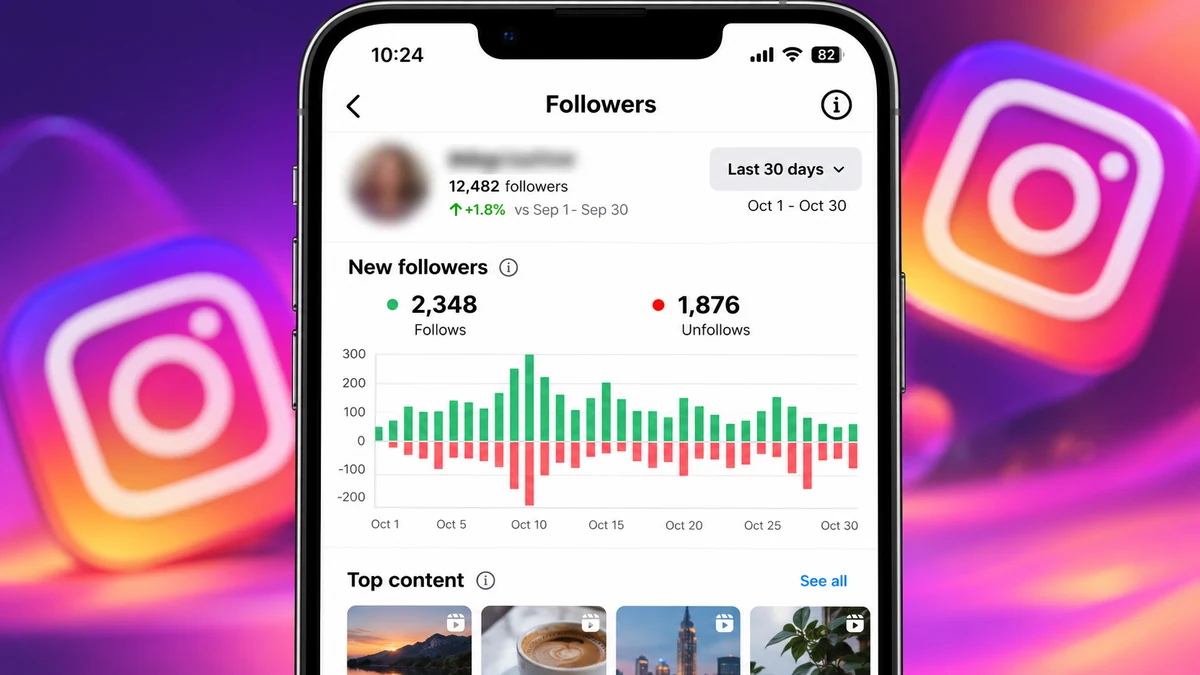
It helps to put a number on the drop before you worry. Compare your follower count today with the count 7 and 30 days ago. Instagram Insights (on a professional account) shows follows and unfollows over time, which makes this easy.
What you see
What it usually means
A few followers lost a day, but you still grow overall
Completely normal background loss
1 to 3% lost over a month, little new growth
Normal loss, but your reach needs work
5 to 10% lost in a few days
Likely a cleanup, or bought or follow-back followers leaving
10% or more in a day or two
Big platform cleanup or a large group of low-quality followers removed
The number goes down, then back up
Display glitch or people returning from a break
These are general patterns from what we see across many accounts, not exact rules. Very small accounts can see bigger percentage changes from just a few unfollows.
Step-by-Step: Find Out Why Your Followers Are Decreasing
Write down the numbers. Note your count today and check Insights for the last 7 and 30 days, so you know the real size of the drop.
Check from another device. Open your profile on instagram.com or from a friend's phone to rule out a display glitch.
Look for a wider cleanup. Search for other people reporting drops on the same days. If many do, it is not about you.
Open Account Status. In Settings, check if any post was removed or is not being recommended.
Review connected apps. Remove any growth or tracking app you do not trust.
Think about past growth. Did you use follow-for-follow, giveaways or cheap bought followers? Those groups leave first.
Compare with your content. Did your topic, schedule or style change around the time the drop began?
Tips to Stop Losing Followers and Grow Again
Keep one clear topic. People follow for a reason. Make it easy to understand what your account is about from your bio and your last nine posts.
Post on a schedule you can keep. Three good posts a week every week is better than ten in one week and none in the next.
Use Reels to reach new people. Most new followers find you through Reels and Explore, not through your profile.
Reply to comments and messages. Active conversations show Instagram and your audience that the account is alive.
Stop follow-unfollow tricks. They bring followers who leave and can get your account limited.
Protect your account. Turn on two-factor authentication and never share your password or login codes.
If you use a growth service, be careful. Choose refill services, order small and slowly, and treat it as a push, not a strategy. Our guide to choosing an SMM panel explains what to check.
Red Flags That Make Drops Worse
"Free followers" apps that ask for your login. They can steal your account and their followers disappear fast.
Very cheap followers with no refill. These come from accounts that Instagram removes first.
Promises of "100% real, never drop" followers. No one can promise that, because only Instagram decides which accounts stay.
Huge jumps in a few minutes. Thousands of new followers overnight look unnatural and tend to drop later.
Buying followers instead of posting. An account with a big number and no activity loses real followers too.
Final Thoughts: Instagram Followers Decreasing Is Usually Normal
In most cases, Instagram followers decreasing is a normal part of having an account. Instagram removes fake and inactive accounts, real people take breaks or lose interest, and follow-back or low-quality followers leave over time. A small, steady loss is not a reason to panic. A sudden big drop is usually a platform cleanup or a sign that a part of your audience was never real in the first place.
Focus on what you control: a clear topic, a steady posting schedule, Reels that reach new people and real conversations with the people who follow you. If you decide to use an SMM panel for a little extra social proof, do it the careful way, with small refill services, a slow pace and real content alongside it. You can see how our Instagram services work and compare refill periods on the full service list before you decide.
Frequently Asked Questions
Why are my Instagram followers decreasing automatically?
Most often Instagram is removing fake, spam or inactive accounts, and their follows disappear with them. Real people deactivating accounts or unfollowing also lowers the count. A small daily loss is normal for every account.
Is it normal to lose Instagram followers every day?
Yes. Almost every account loses a few followers a day. It only becomes a problem when you lose more than you gain for several weeks, or when you suddenly lose 10% or more.
Is there an Instagram followers decreasing glitch?
Sometimes the count shows a lower number for a short time during updates. Check your profile on instagram.com or another phone. If the number goes back to normal in a day or two, it was a display issue.
Do Instagram followers come back after a drop?
Followers who deactivated their account can come back when they log in again. Accounts that Instagram deleted will not come back. If the drop came from a refill service, request a refill inside the refill period.
Why do bought Instagram followers decrease?
Cheap followers often come from newer or empty accounts, and Instagram removes those first. Services with refill send the missing amount again for free within the refill period, but no service can promise zero drop.
How can I stop losing followers on Instagram?
Keep a clear topic, post on a steady schedule, use Reels to reach new people, reply to comments and avoid follow-unfollow tricks. You cannot stop every unfollow, but you can gain faster than you lose.
An SMM panel can be safe for Instagram if you use it carefully, but it is never risk-free. A real panel only needs your public profile or post link, so nobody can take over your account, and Instagram rarely bans an account only for getting followers or likes. The real risks are smaller and easier to control: some followers can drop, a very fast spike can look unnatural, and low-quality accounts can hurt your engagement. This guide shows exactly what can go wrong, how big each risk is, and how to order safely.
Is an SMM Panel Safe for Instagram? The Short Answer
Safe is a relative word, so here is the honest version. Using an SMM panel does not give the panel access to your account, and it does not put your password at risk. That part is safe as long as you never type your login into a website that is not Instagram. But Instagram's rules are against fake or inauthentic activity, so there is always some risk that the platform removes the accounts that followed you, or limits an account that grows in a strange way.
In daily use, this risk shows up as small things: a few followers disappearing after a week, a post that gets less reach than before, or an order that does not start because the account is private. It rarely shows up as a ban. If you understand each risk and order in a sensible way, an SMM panel can be a useful tool for early social proof, new Reels and small business pages.
At JTSMMPANEL we have been running since 2020 and have processed more than 1.9M orders, so we see the same patterns again and again. The buyers who have problems are almost always the ones who order too much, too fast, from the cheapest service they can find. The buyers who have a smooth experience start small, read the service description and keep posting real content.
How an SMM Panel Works With Your Instagram Account
When you place an order, you choose a service, paste the public link of your profile, post or Reel, and enter a quantity. The panel sends the order to a provider, and the provider delivers the followers, likes or views to that link. You do not log in anywhere, and the panel never connects to your account. You can see this on our Instagram SMM panel page where every service asks for a link and a quantity, nothing else.
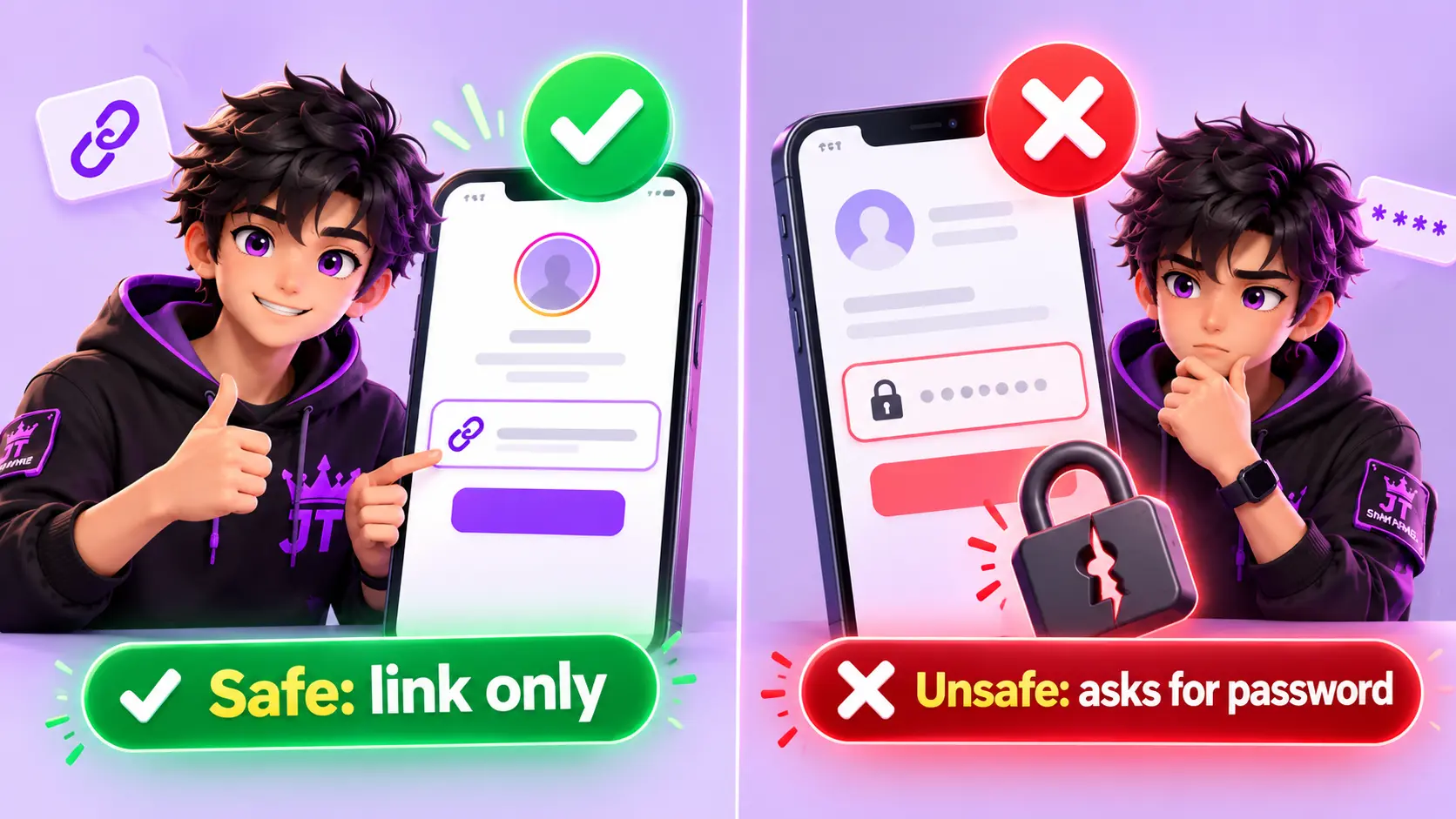
This is the most important safety rule: if a website asks for your Instagram password, a login code or a "verification" through your account, it is not an SMM panel and you should leave. That is how accounts are hacked. Growth services do not need your login to work.
Your Password and Login Stay Private
The first risk people think about is account theft, and it is also the easiest to remove. A normal order uses only a public link, such as your profile URL or the link of one Reel. Because of that, the panel has nothing it could use to get into your account. It does not know your password, and it cannot post, delete or message from your profile.
Be careful with two things. First, fake "free followers" sites that ask you to sign in with Instagram. Those are the ones that steal accounts. Second, never share a one-time code from your email or phone with anyone who contacts you about your order. Our support will never ask for it. If you want extra protection, turn on two-factor authentication on Instagram and use a unique password that you do not use anywhere else.
Drops: When Followers Disappear
A drop is when your follower or like count goes down after an order is complete. It is the number one thing buyers complain about, and it is normal to a degree. Instagram regularly removes inactive and fake accounts, and when those accounts are deleted, their follows disappear from your profile too. Cheap services drop more because they usually come from accounts that get removed faster.
You cannot remove drops completely, and any panel that says "100% non-drop forever" is not telling the full truth. What you can do is manage them. Choose services that include refill, so the missing amount is sent again for free within the refill period. If you want to understand every label in detail, read SMM Panel Refill and Drop Explained.
On JTSMMPANEL, if a refill service drops, you open your Orders page and press the refill button on that order. If the button is not available or something looks wrong, open a support ticket with the order ID and our team checks it.
Speed: Why Fast Growth Looks Unnatural
Instagram's systems look for patterns. An account that normally gains 20 followers a day and suddenly gains 5,000 in ten minutes is a pattern that looks strange, whether the followers are real or not. This does not mean a ban is coming, but it increases the chance that Instagram reviews the activity and removes the accounts behind it.
The fix is simple: slow down. If the service supports drip-feed, use it, so the order is delivered in small parts over hours or days. If not, split a large order into smaller ones and place them on different days. A page that grows from 1,000 to 1,800 followers in a week looks like a page that is doing something right. A page that jumps from 1,000 to 20,000 overnight looks like an order.
Also avoid stacking orders. If you place a second order on the same link while the first one is still running, both can behave in unexpected ways, and you may see delays or a count that does not match. Wait for the first order to finish before you start the next one. If an order stays on pending, our guide on why an SMM panel order gets stuck on pending explains the common causes.
Quality and Engagement: The Reach Problem
Followers are not only a number. Instagram shows your posts to a small group of your followers first, and if that group likes, comments or saves, the post is shown to more people. If a large part of your followers are empty accounts that never interact, the first group reacts less, and your reach can slowly go down. This is the most common long-term effect of low-quality followers.
This does not mean followers are useless. They can still work as social proof, because many people judge an account by its number before they decide to follow or buy. But the number is only the first step. Real posts, clear Reels and replies to comments are what turn visitors into real customers. A good rule is to keep your purchased amount reasonable compared with your real audience, and to spend as much effort on content as on the order.
For this reason, likes and views usually carry less risk than followers. A Reel view or a post like is tied to one piece of content. If some of them drop, your whole profile is not affected, and you do not end up with a large group of silent accounts.
Account Type: Public, Private, Business and Creator
Your account setup matters. A private account blocks most orders, because the provider cannot see the profile or post. Orders on private accounts usually stay on pending or end as partial or canceled. Switch the account to public before ordering, and keep it public until the order is complete.
Business and creator accounts are fine to use, and many of our buyers are small shops, creators and agencies. Just keep in mind that a business account relies on trust. If customers see a big follower number but almost no likes or comments, they may doubt the page. In that case, add likes or views to your latest posts too, so the page looks balanced.
Do not change your username while an order is running. The order uses the old link, so a username change can make it fail or stop. If you must rename, wait until the order is finished and then use the new link for any future order.
Instagram's Rules and the Chance of a Ban
Instagram and Meta do not allow fake or inauthentic activity, including buying followers or likes. So you should know that using any growth service goes against the platform's rules in principle. In practice, the platform's response is usually to remove the fake accounts, which causes drops, and sometimes to limit certain actions on an account that does something unusual. Banning an account only because it received followers is uncommon.
Bans and restrictions are far more often linked to other things: copyright strikes, spam messages, using too many hashtags or links in a short time, mass following and unfollowing, or using third-party apps that log in as you. Those are risks you control. A panel that only needs a link does not cause them.
If your account is very important, such as a business that makes most of its sales from Instagram, be extra careful. Use small orders, choose refill services and do not depend only on purchased growth. No honest provider can promise that your account will never be limited, and we do not.
Scam Panels and Payment Safety
The last risk has nothing to do with Instagram. It is the panel itself. Because anyone can create an SMM panel website, there are many that take your deposit and deliver nothing, or disappear after a month. Your money is safer when you choose a panel with a real history, visible support, clear service descriptions and payment methods you understand.
Before you add a large amount, check the basics. Is there a working support channel, and does it reply? Do services show start time, speed and refill details? Does the panel show recent completed orders so you can see real activity? Can you find the owner or company behind it? Our checklist in How to Choose the Best SMM Panel covers all of this. If you are comparing a panel with freelancers, you can also read SMM Panel vs Buying Followers From Fiverr.
Which Instagram Services Are Safest?
Service
Risk level
Notes
Reel and video views
Lowest
Tied to one video. Helps a new Reel get its first push.
Post likes
Low
Short-term social proof. Drops do not affect your profile.
Followers with refill
Low to medium
Order small amounts, spread them over days and use refill.
Followers without refill
Medium
Cheapest, but drops are not replaced. Use for tests only.
Comments
Medium
Can look generic if overused. Order a few and keep them relevant.
If you are not sure where to start, begin with views or likes on one post, check the result, and only then add followers.
A Step-by-Step Safe Test Before You Order Big
Make the account public. Check that the profile or post opens without logging in.
Copy the exact link. Use the profile or post URL from the share button, not a screenshot or a username with extra symbols.
Read the service description. Check start time, speed, refill period and any warning, such as a minimum or maximum amount.
Place a small test order. For example 100 followers or 200 likes, to see start time and quality.
Wait for completion. Do not place a second order on the same link until the first one is done.
Check after 3 to 7 days. See whether the count is stable. If it dropped, test the refill button on your Orders page.
Scale up slowly. If everything looks good, increase the amount step by step, not all at once.
Red Flags of an Unsafe Panel
It asks for your password or login code. A real panel never needs it.
Prices are far below everyone else. This usually means poor quality and heavy drops.
It promises "100% real" or "guaranteed sales". No honest service can promise that.
There is no refill option and no support. When something goes wrong, nobody answers.
The owner and contact details are hidden. You cannot get help or a refund if there is a problem.
What to Do If Something Goes Wrong
If your count dropped, open the Orders page and request a refill on that order, as long as the service has refill and the period is still active. If an order did not start, check that the account is public and the link is correct, then open a support ticket with the order ID. If you need to cancel, or you used the wrong link, open a ticket as soon as possible, because the sooner we check it with the provider, the more we can do.
If Instagram shows a warning or limits an action on your account, stop placing new orders for a week, post normal content, and avoid other risky actions such as mass following. When you come back, order less and more slowly. Our support is available 24/7 through the contact page and tickets.
Final Thoughts: Is an SMM Panel Safe for Instagram?
So, is an SMM panel safe for Instagram? It is reasonably safe for your account and password when you use a real panel with link-only orders, but it is not without risk. Drops, uneven engagement and rules against fake activity are real, and anyone who tells you otherwise is selling something. The good news is that most of these risks are in your control: choose refill services, start with a small test, grow slowly, keep your account public during orders and keep posting real content.
Use a panel as a helper for early social proof, not as a replacement for a real audience. If you want to try it the careful way, create an account, add a small amount and run a test order on one post. You can also look at recent completed orders and browse the full service list to compare descriptions before you buy.
Frequently Asked Questions
Can my Instagram account get banned for using an SMM panel?
It is uncommon. Instagram usually removes the fake accounts behind the followers, which causes drops, instead of banning the account. Small orders, refill services and a slow pace keep the risk low, but no one can promise zero risk.
Does an SMM panel need my Instagram password?
No. A real SMM panel only needs the public link of your profile or post. Never share your password or login code with any growth service.
Why did my Instagram followers drop after an order?
Instagram regularly removes inactive and fake accounts, and their follows disappear with them. Choose a service with refill so the missing followers are sent again for free.
Is it safe to buy Instagram likes and views instead of followers?
Likes and views are usually lower risk, because they are tied to one post or Reel and do not add a large group of silent followers to your profile.
Can I use an SMM panel on a private Instagram account?
Not well. The provider cannot see a private profile or post, so the order may stay on pending or be canceled. Switch the account to public before ordering.
How many followers should I order at once?
Start with a small test, such as 100 to 500, then increase slowly over several days. Spreading the order with drip-feed or smaller orders looks more natural than one large jump.